How to Price 3D Printing Services Accurately
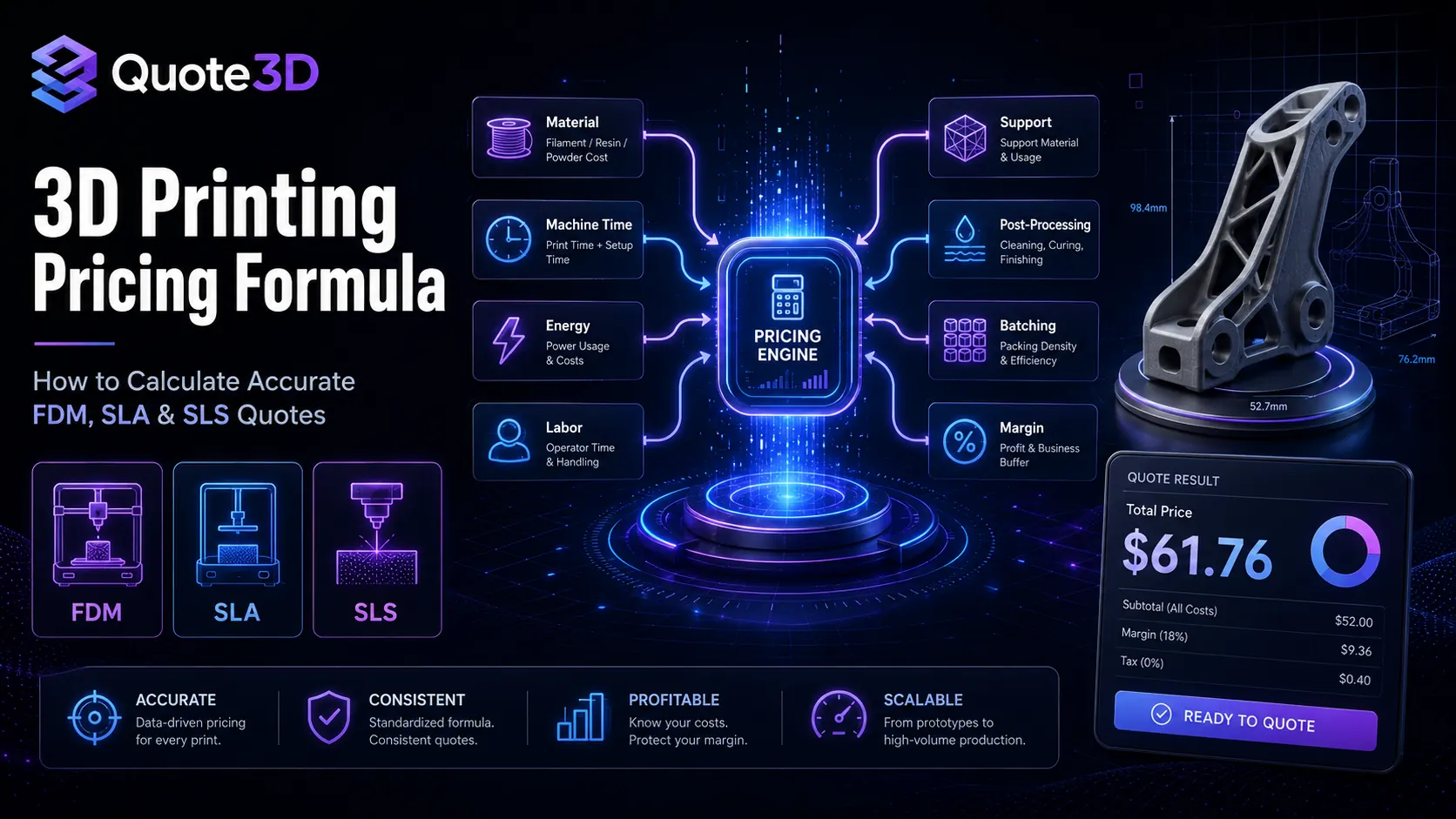
3D Printing Pricing Formula: How to Calculate Accurate FDM, SLA, and SLS Quotes
Manual quoting is one of the most common bottlenecks in a 3D printing business. A customer uploads a model, asks for a price, and waits while someone checks the file, estimates material usage, guesses print time, adds a rough margin, and sends back a number. That process may work for a few orders per week, but it quickly becomes unreliable when quote volume grows.
The problem is not only speed. The bigger issue is consistency.
Two similar parts may receive different prices depending on who calculates them. Large batch orders may be underpriced because fixed machine overhead is applied incorrectly. SLA and SLS jobs may be priced like simple FDM prints even though their cost structures are different. Support material, failed-print risk, post-processing, machine depreciation, and energy usage may be ignored entirely.
A reliable 3D printing pricing formula solves this.
In this guide, we will break down the full cost structure behind accurate 3D printing quotes, explain how FDM, SLA, and SLS pricing differ, and show how automated quoting software like Quote3D helps turn manual estimates into repeatable, production-ready pricing workflows.
Quote3D is designed for 3D printing services and small print farms that need instant quotes from STL, 3MF, and OBJ files, with support for FDM, SLA, and SLS workflows.
Why Material-Only Pricing Fails
A common beginner formula looks like this:
Price = Material Used × Material Cost × MarkupThis is simple, but it misses most of the real cost of producing a printed part.
A 3D print is not only a piece of plastic, resin, or powder. It also consumes machine time, operator time, energy, build volume, post-processing effort, quoting time, packing time, and business overhead. It may require support structures. It may fail. It may need sanding, cleaning, curing, dyeing, painting, inspection, or manual approval.
That is why material-only pricing usually creates one of two problems:
Problem 1:
You underprice complex jobs and lose margin.

Problem 2:
You overprice simple jobs and lose customers.
Accurate pricing must reflect how the part will actually be produced.
Quote3D’s documentation describes pricing as more than a material-weight markup. Its cost model includes material cost, simulated print time multiplied by machine hourly rate, energy overhead, post-processing, fixed fees, margins, tax, and currency settings.
The Complete 3D Printing Pricing Formula
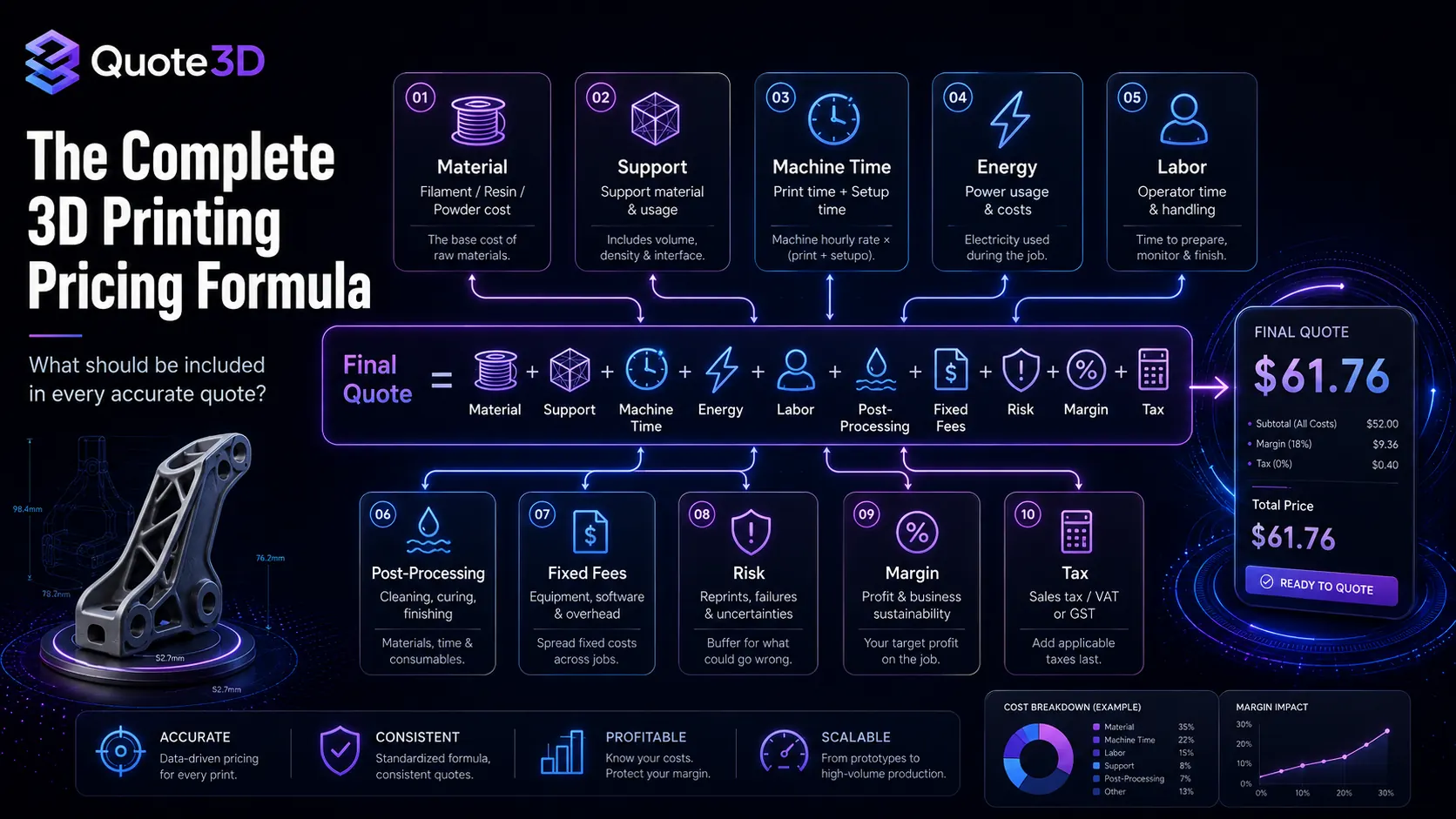
A practical 3D printing pricing formula looks like this:
Final Quote =
Material Cost
+ Support Material Cost
+ Machine Time Cost
+ Energy Cost
+ Labor Cost
+ Post-Processing Cost
+ Setup / Fixed Fee
+ Risk Allowance
+ Packaging / Handling
+ Profit Margin
+ Tax
A more operational version:
Final Quote =
((Material + Machine Time + Energy + Labor + Post-Processing + Fixed Fees + Risk)
× Margin Multiplier)
+ Tax
This formula should not be applied blindly. The values need to change based on:
Technology: FDM, SLA, or SLS
Material: PLA, PETG, ABS, resin, nylon, etc.
Machine profile: build volume, speed, energy usage, hourly rate
Geometry: volume, surface area, overhangs, support needs
Quantity: one-off part or batch production
Lead time: standard or urgent
Post-processing: none, basic, premium, or custom
Business model: prototype shop, print farm, industrial bureau, or eCommerce store
The goal is not to make pricing complicated for the customer. The goal is to calculate complexity internally, then present a clear and trustworthy quote externally.
1. Material Cost
Material cost is the easiest part of the formula, but it still needs precision.
For FDM, material cost usually depends on filament weight:
Material Cost = Filament Used in Grams × Cost per GramFor SLA, it depends on resin volume and density:
Material Cost = Resin Volume × Resin Cost per UnitFor SLS, it depends on powder usage, refresh ratios, nesting efficiency, and how much of the powder bed is effectively consumed by the job.
Material cost should include:
Model material
Support material
Purge or waste allowance
Failed-print allowance
Material-specific handling cost
For example, a 40 g PLA prototype and a 40 g nylon SLS part should not be priced the same. The material cost, machine setup, post-processing, and production workflow are different.
Quote3D supports professional geometry analysis for STL, 3MF, and OBJ files and provides material usage and print time estimates through async quote jobs.
2. Support Material Cost
Support material can quietly destroy profit margins.
A part that weighs 50 g may require 20 g of support depending on orientation, overhangs, layer height, and technology. That support material still costs money. It also increases print time and post-processing time.
Support pricing should consider:
Support volume
Support density
Support removal difficulty
Support interface settings
Technology-specific support behavior
Surface finish requirements
For FDM, support may increase filament usage and labor. For SLA, support removal and curing can require additional manual work. For SLS, support structures are not used in the same way because unsintered powder can support the part, but powder handling and nesting efficiency become important.
Quote3D’s engine evaluates technical metrics such as support volume, printability, surface area, and geometric integrity as part of its production analysis.
3. Machine Time Cost
Machine time is one of the most important pricing components.
A small part with complex geometry may use little material but take a long time to print. If you only charge for grams, you lose money on machine utilization.
Basic formula:
Machine Time Cost = Estimated Print Hours × Machine Hourly RateYour machine hourly rate should include:
Machine depreciation
Maintenance
Nozzles, vats, screens, lasers, filters, or consumables
Expected downtime
Operator supervision
Facility overhead
Target utilization rate
For example:
Estimated print time: 5 hours
Machine hourly rate: $8/hour

Machine Time Cost = 5 × 8 = $40
The Quote3D documentation explains that its engine adapts calculation logic by technology: FDM calculations include filament paths, layer-by-layer shell generation, infill geometries, support structures, nozzle size, speeds, and acceleration-related factors; SLA calculations use layer exposure and lift/retract movement; SLS calculations include laser speed, hatch spacing, layer recoat time, and pre-heating/cooling time.
That distinction matters because “print time” is not calculated the same way across all 3D printing processes.
4. Energy Cost
Energy is often a smaller cost than machine time or labor, but it becomes meaningful at scale.
Basic formula:
Energy Cost = Machine Power in kW × Print Hours × Electricity Cost per kWhExample:
Machine power: 0.35 kW
Print time: 8 hours
Electricity cost: $0.20/kWh

Energy Cost = 0.35 × 8 × 0.20 = $0.56
For a single small print, this may look insignificant. For a farm running dozens of printers every day, it becomes part of the operational model.
Quote3D’s pricing model can factor energy overhead using local energy cost and machine wattage.
5. Labor Cost
Labor is one of the most commonly ignored costs in 3D printing.
Even an “automated” print still requires human work:
Reviewing the model
Preparing or approving print settings
Removing the part
Removing supports
Cleaning the machine
Curing or washing resin parts
Depowdering SLS parts
Quality control
Packaging
Customer communication
Manual quoting
Basic formula:
Labor Cost = Labor Time in Hours × Hourly Labor RateYou can separate labor into categories:
Setup labor
Post-processing labor
Quality control labor
Admin / customer support labor
Packaging labor
A simple FDM prototype may require only a few minutes of labor. A high-detail SLA model with delicate supports may require careful manual finishing. An SLS production batch may require depowdering, sorting, and inspection.
If labor is not included, your business may appear profitable on material cost while actually losing money on human time.
6. Post-Processing Cost
Post-processing should never be hidden inside a generic markup unless it is truly standard and predictable.
Post-processing may include:
Support removal
Sanding
Resin washing
UV curing
Depowdering
Dyeing
Painting
Vapor smoothing
Threaded inserts
Assembly
Inspection
Special packaging
A useful pricing structure is:
No post-processing:
Included in base price

Standard post-processing:
Fixed fee or percentage

Premium post-processing:
Custom cost based on labor and material

Manual review:
Required for complex finishing
For customer clarity, post-processing should be presented as a selectable option when possible. This makes the quote feel transparent and lets customers choose between speed, quality, and cost.
7. Setup Fees and Minimum Order Value
Some jobs are too small to be profitable without a fixed fee.
A 10-minute print may use only a few cents of material, but the business still needs to handle the upload, review, setup, packaging, and payment processing. That is why many 3D printing services use a minimum order value or setup fee.
Examples:
Minimum order value: $10
Small part setup fee: $3
Rush order setup fee: $15
Manual review fee: Custom
A setup fee protects your margin on small jobs while keeping the formula fair for larger orders.
Quote3D allows pricing settings such as fixed fees, post-processing options, tax rates, and selected currency to be applied as part of quote configuration.
8. Quantity and Batch Pricing
Quantity is where many manual quotes become inaccurate.
If a customer orders 1 part, the full setup and machine overhead applies to that single part. If they order 50 parts, some costs may be shared across the batch. But the discount should not be random. It should reflect real production efficiency.
A good batch-pricing model considers:
How many parts fit on the build plate or in the build volume
How many batches are required
Whether fixed overhead applies per part or per batch
Whether operator labor increases linearly
Whether post-processing creates a bottleneck
Quote3D’s documentation describes technology-specific quantity logic: FDM and SLA parts can be placed side-by-side on X/Y axes as space permits, while SLS can use X, Y, and Z stacking to utilize powder bed capacity. It also explains that fixed overhead costs can be applied per required batch rather than per part when multiple parts fit in a single production run.
This is a major advantage for volume manufacturing because the quote can reflect real packing and batching instead of a simple “unit price × quantity” calculation.
9. Risk Allowance
Every 3D printing business deals with failed prints.
Risk can come from:
Thin walls
Poor bed adhesion
Warping
Non-manifold geometry
Large unsupported overhangs
High aspect ratio parts
Resin suction forces
Difficult support removal
Material shrinkage
Customer files with unit scale issues
A pricing model should include risk in one of three ways:
1. Add a general failure allowance to all quotes.
2. Add a higher risk multiplier to complex jobs.
3. Route risky files to manual review instead of instant checkout.
The third option is often the best. Easy jobs can be quoted instantly, while risky jobs are flagged before they create production losses.
Quote3D includes printability checks for measurements, volume, surface area, open edges, non-manifold geometry, bed adhesion risk, and boundary verification.
10. Profit Margin
Profit margin is not the same as markup.
Markup is added to cost. Margin is the percentage of the final selling price that remains as profit. Many businesses confuse the two and accidentally underprice their work.
Example:
Cost: $20
Markup: 50%

Selling Price = $20 × 1.5 = $30
Profit = $10
Profit Margin = 33.3%
A 50% markup does not mean a 50% profit margin.
For service businesses, margin should cover:
Business profit
Sales and marketing
Software tools
Customer support
Failed orders
Taxes and accounting
Future machine upgrades
A healthy pricing system should let you adjust margin by technology, material, urgency, customer type, or production complexity.
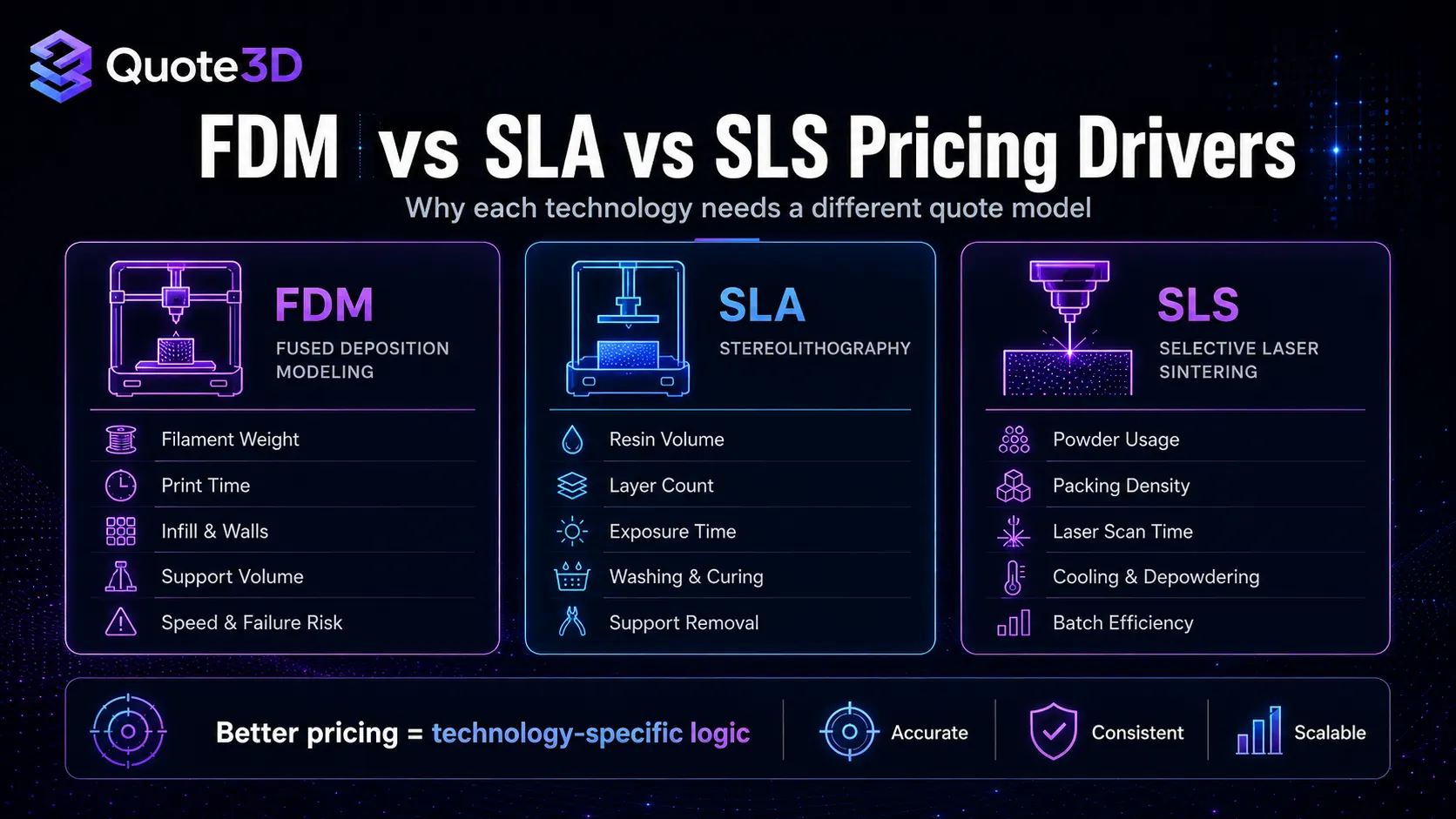
FDM Pricing: What to Watch
FDM is often the most accessible and cost-effective 3D printing technology, but that does not mean pricing should be simplistic.
Important FDM pricing variables:
Filament weight
Print time
Layer height
Nozzle size
Infill percentage
Wall count
Support volume
Print speed
Bed adhesion settings
Material type
Failure risk
PLA prototypes may be easy to price. ABS parts may require more attention because warping risk and enclosure requirements affect success rate. Flexible materials may print slowly. Engineering materials may require higher nozzle temperatures, slower speeds, or additional machine wear.
A strong FDM quote should answer:
How much filament will be used?
How long will the machine be occupied?
How much support is required?
Does the part fit the printer?
Is the material suitable for the geometry?
Does the selected layer height match the customer’s quality expectation?
Quote3D’s FDM calculations account for technology-specific factors such as filament path lengths, shells, infill, support structures, nozzle size, speeds, and acceleration-related machine behavior.
SLA Pricing: What to Watch
SLA pricing is different from FDM pricing because resin printing depends heavily on layer exposure, support strategy, cleaning, and curing.
Important SLA pricing variables:
Resin volume
Layer height
Number of layers
Exposure time
Lift and retract movement
Support density
Washing time
Curing time
Resin waste
Manual support removal
Surface quality requirements
SLA parts often have high customer expectations because the technology is associated with smooth surfaces and fine details. This means post-processing and handling should be included carefully.
A strong SLA quote should answer:
How much resin will be consumed?
How many layers are required?
How long will exposure and lift cycles take?
How delicate is support removal?
Is washing and curing included?
Does the part require premium finishing?
Quote3D’s SLA calculation model uses light-exposure metrics, layer count, base layer exposure behavior, and resin-vat movement to estimate print time.
SLS Pricing: What to Watch
SLS pricing is often the hardest to estimate manually because batch utilization matters so much.
Important SLS pricing variables:
Powder volume
Part volume
Bounding box
Packing density
Powder refresh ratio
Layer count
Laser scan time
Recoating time
Preheating and cooling
Depowdering
Dyeing or finishing
Batch utilization
A single SLS part may seem expensive because the machine has fixed process overhead. But a well-packed batch can reduce per-part cost significantly.
A strong SLS quote should answer:
How efficiently can the part be nested?
Can multiple parts share the same build?
How much powder bed capacity is used?
How much fixed overhead applies to the batch?
What post-processing is required after printing?
Quote3D’s SLS logic includes laser speed, hatch spacing, layer recoat time, pre-heating/cooling time, and 3D stacking inside the powder bed.
Example: Manual Pricing Breakdown
Here is a simplified example for an FDM part.
Material used:
80 g

Material cost:
$0.025/g

Material cost total:
80 × 0.025 = $2.00

Print time:
6 hours

Machine hourly rate:
$5/hour

Machine cost:
6 × 5 = $30.00

Labor:
15 minutes

Labor rate:
$24/hour

Labor cost:
0.25 × 24 = $6.00

Energy:
$0.75

Post-processing:
$4.00

Fixed fee:
$3.00

Subtotal:
$45.75

Margin multiplier:
1.35

Pre-tax quote:
$61.76
The material cost is only $2.00, but the realistic price is much higher because machine time, labor, post-processing, and margin are included.
This is exactly why “grams × markup” pricing is risky.
How Automated Quoting Improves Pricing
Automated quoting does not mean removing control from your business. It means converting your pricing rules into a repeatable system.
A strong automated quoting workflow should:
Analyze uploaded geometry
Measure dimensions and volume
Check printability
Estimate material and support usage
Simulate or estimate print time
Apply printer and material profiles
Calculate batch efficiency
Add fixed fees, energy, labor, post-processing, margin, and tax
Return a clear quote to the customer
Store quote history for review and analytics
Quote3D provides REST API and embeddable widget workflows for 3D printing analysis, async quote generation, and production workflows. Its docs describe a typical flow: upload a STL, 3MF, or OBJ file, configure printer and pricing settings or use defaults, create an async quote job, then poll the job endpoint or use webhooks to retrieve material usage, print time, and total cost.
Where the Quote3D Workflow Fits
A practical Quote3D-powered quoting workflow looks like this:
Customer uploads 3D model
        ↓
Quote3D analyzes geometry
        ↓
System checks printability
        ↓
Quote job calculates material, time, and price
        ↓
Customer receives instant quote
        ↓
Quote is sent to cart, CRM, ERP, or production queue
For businesses that want a customer-facing interface, the Quote3D Widget can be embedded into a website or eCommerce platform. The widget provides model preview, instant pricing based on material and printer profiles, support for FDM/SLA/SLS, custom themes, and platform options such as WooCommerce and Shopify.
For developers or custom software teams, the API can be used directly. QuoteD’s quickstart guide describes an endpoint decision path that includes backend upload, browser upload through a public upload route, printability checks, quote job creation, job polling, and quote history retrieval.
Manual Quoting vs Automated Quoting
Area | Manual Quoting | Automated Quoting |
|---|---|---|
Speed | Minutes or hours per quote | Instant or near-instant |
Consistency | Depends on the person quoting | Uses repeatable rules |
Scalability | Hard to scale with volume | Handles more quote requests |
Batch pricing | Often estimated manually | Can apply batch logic |
Customer experience | Wait for response | Upload and receive quote |
eCommerce fit | Requires manual handoff | Can connect to cart |
Data tracking | Often scattered | Quote history and analytics |
Printability | May be checked later | Can be checked before pricing |
The biggest benefit is not only faster quotes. It is better pricing discipline.
When your pricing rules are automated, your team spends less time calculating and more time improving production, customer service, and fulfillment.
Common 3D Printing Pricing Mistakes
Mistake 1: Charging only for material
Material is only one part of the job. Machine time, labor, energy, support, risk, post-processing, and margin must also be included.
Mistake 2: Using the same formula for FDM, SLA, and SLS
Each technology has different cost drivers. FDM depends heavily on filament paths, infill, and support. SLA depends on exposure, layers, resin handling, washing, and curing. SLS depends on powder-bed utilization, nesting, recoating, cooling, and post-processing.
Mistake 3: Ignoring failed-print risk
Some geometry is risky. Thin walls, bad mesh integrity, bed adhesion risk, and non-manifold errors should affect the workflow.
Mistake 4: Giving random volume discounts
Batch pricing should be based on how parts actually fit into the build volume and how fixed costs are shared.
Mistake 5: Forgetting post-processing
Support removal, sanding, washing, curing, depowdering, dyeing, painting, and inspection can turn a profitable quote into an unprofitable order if they are not priced.
Mistake 6: Making customers wait too long
The longer a customer waits for a quote, the more likely they are to compare alternatives or abandon the order. Instant quoting improves the buying experience by reducing friction.
A Better Pricing Framework for 3D Printing Services
Use this framework when building or improving your quote system:
1. Define machine profiles
Set hourly rate, build volume, speed assumptions, energy usage, and maintenance overhead.

2. Define material profiles
Set cost per gram, density, support behavior, waste allowance, and material-specific risk.

3. Define technology rules
Separate FDM, SLA, and SLS logic instead of forcing every job into one formula.

4. Define post-processing options
Separate standard finishing from premium finishing.

5. Define minimum order rules
Protect small jobs from becoming unprofitable.

6. Define batch logic
Calculate how many units fit into one build and how overhead is shared.

7. Define risk routing
Instant-quote normal jobs and send risky files to manual review.

8. Define margin strategy
Apply profit margin intentionally, not randomly.

9. Connect quote to checkout
Let customers continue from quote to order without manual back-and-forth.

10. Track results
Use quote history and analytics to improve pricing over time.
Quote3D supports dashboard-based default printer, material, and quote configurations, while allowing request-level overrides for specific jobs. This helps businesses keep API requests clean while still supporting advanced edge cases.
When Should You Automate Your 3D Printing Quotes?
You should consider automated quoting when:
You receive more quote requests than your team can answer quickly.
Different team members calculate prices differently.
Customers frequently ask for instant estimates.
You sell custom 3D prints through an eCommerce store.
You support multiple technologies or materials.
You want to reduce manual admin work.
You need quote history and analytics.
You want to connect quoting to checkout, CRM, ERP, or production workflows.
Automation is especially valuable for print farms and service bureaus that process many small or medium jobs. Instead of manually calculating every quote, your team can define the pricing logic once and let the system handle repetitive work.
Quote3D’s platform includes quote history, analytics, webhooks, widgets, API-based workflows, and production-oriented integrations.
Final Thoughts
Accurate 3D printing pricing is not about guessing a number that “feels right.” It is about understanding the real production cost of each job and applying a repeatable formula.
A strong quote should include:
Material
Support
Machine time
Energy
Labor
Post-processing
Setup fees
Risk
Batch efficiency
Margin
Tax
For a small shop, this creates consistency. For a growing print farm, it creates scalability. For an eCommerce business, it creates a smoother customer experience. For developers, it creates a pricing engine that can be connected directly to websites, carts, dashboards, and production systems.
Quote3D helps bring that workflow together by combining 3D model analysis, printability checks, async quote generation, widget-based quoting, API integrations, and production automation.
The result is simple: customers upload a file, receive a clear quote, and move toward checkout faster — while your business protects its margins with a more accurate pricing model.
Ready to automate your 3D printing pricing?
Use Quote3D to turn STL, OBJ, and 3MF uploads into accurate FDM, SLA, and SLS quotes with automated material usage, print time, printability checks, widget integration, API workflows, and eCommerce-ready quote handling.
FAQ Section
What is the best formula for pricing 3D prints?
A strong 3D printing pricing formula includes material cost, support material, machine time, energy, labor, post-processing, setup fees, risk allowance, profit margin, and tax. Material-only pricing is usually incomplete because it ignores machine usage and human labor.
How do you calculate FDM print cost?
FDM print cost is usually based on filament weight, support material, print time, machine hourly rate, energy, labor, post-processing, and margin. Layer height, infill, wall count, nozzle size, speed, and support settings can all affect the final price.
How do you calculate SLA print cost?
SLA print cost depends on resin usage, layer count, exposure time, lift/retract movement, support structures, washing, curing, support removal, labor, and finishing requirements.
How do you calculate SLS print cost?
SLS print cost depends on powder usage, powder-bed packing efficiency, laser scan time, recoating time, preheating, cooling, depowdering, post-processing, and batch utilization.
Why is automated quoting better than manual quoting?
Automated quoting improves speed, consistency, and scalability. It applies the same pricing rules to every job, reduces manual admin work, helps customers get quotes faster, and can connect quotes directly to checkout or production workflows.
Can Quote3D calculate quotes for STL, OBJ, and 3MF files?
Yes. Quote3D supports STL, OBJ, and 3MF files for 3D model upload and analysis.
Does Quote3D support FDM, SLA, and SLS pricing?
Yes. Quote3D supports FDM, SLA, and SLS workflows with technology-specific calculation logic.